

We'll cover
How Often Should You Update Your Resume (Checklist and Guide in 2026)
Written by Palak Jain
- Update your resume every six months to stay job-ready.
- Add new skills, achievements, and recent work experience regularly.
- Remove outdated skills and information from your resume.
- Keep resume and LinkedIn profile information consistent.
- Use keywords to improve ATS visibility during job search.
We'll cover:
Why Regular Resume Updates Matter for Your Career?
The process of maintaining an updated resume becomes essential for your professional development throughout your career. Your resume becomes a valuable asset which enables you to pursue new job search opportunities whenever they arise.
- Stay Ready for Opportunities: Job candidates should maintain up-to-date resumes because it enables them to apply without needing to collect all their information again.
- Show Your Growth: Your resume needs to show your professional growth through your acquired skills and completed projects and achieved outcomes. This helps employers see how you have grown professionally.
- Match Current Hiring Needs: Job market requirements experience continuous evolution throughout different time periods. The process of updating your resume enables you to demonstrate your current abilities together with your past professional accomplishments which employers seek.
- Keep Your Online Profile Consistent: The process of updating your resume should occur together with LinkedIn profile updates which will ensure both platforms display identical information.
- Stay ATS-Friendly: Many companies use ATS software to screen resumes. The process of updating your resume requires you to modify keywords and other information to maintain compatibility with these systems.
The process of maintaining an updated resume enables you to stay prepared while making your future job searches more efficient.
How Often Should You Update Your Resume?
People only update their resumes when they begin their job search but regular resume updates enable better workplace readiness and maintain better organizational systems for resume scanner for jobs.
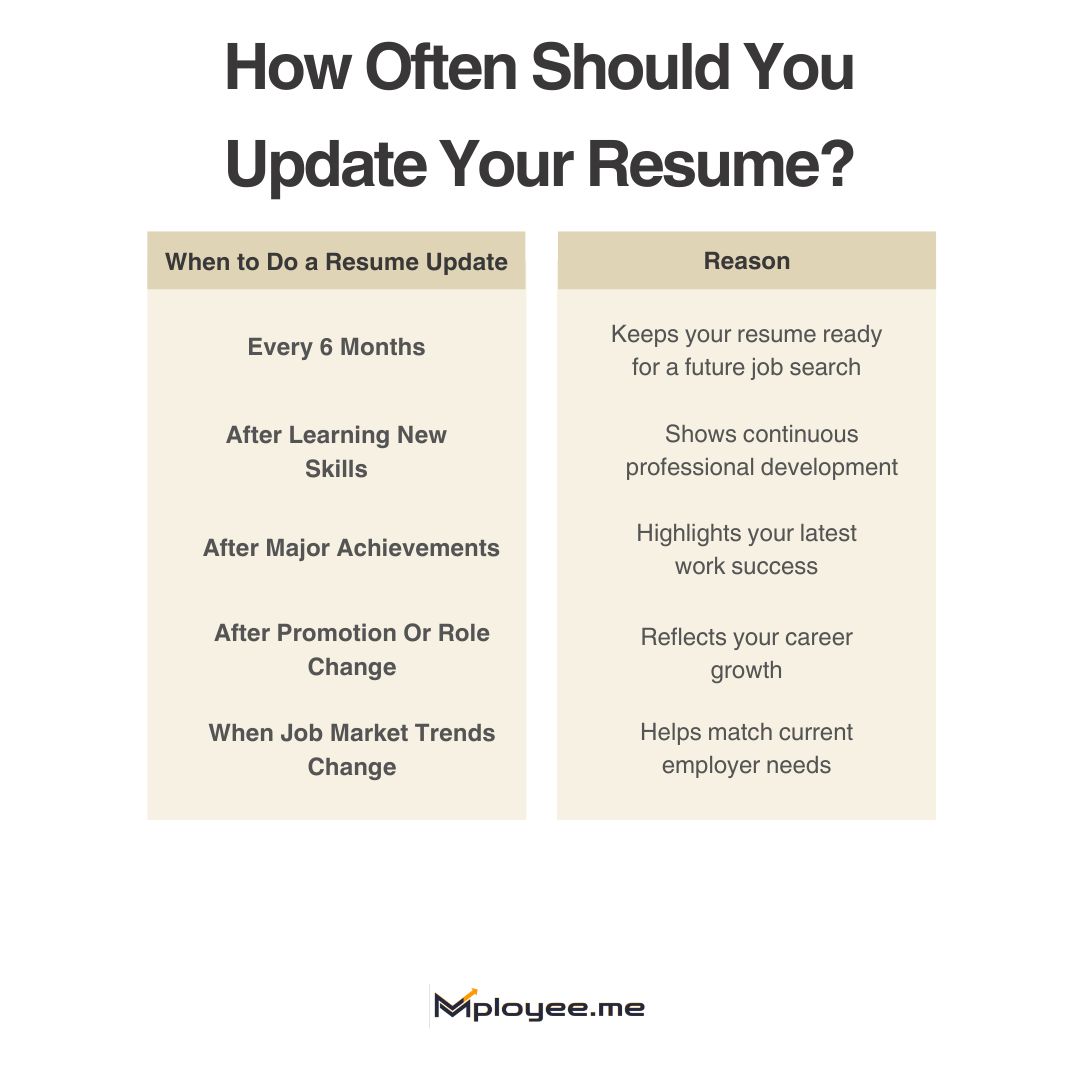
- Every Six Months: A resume update every six months is a simple habit that many career advice experts recommend. Your achievements maintain your record while your future job search requires your updates.
- After Learning New Skills: When you learn a new skill or complete training, you should add it to your resume. This supports your professional development and shows employers that you continue to improve.
- After Major Work Achievements: The best time to update your resume happens after you complete essential work projects or achieve significant workplace milestones. Small resume tips like this help you remember key accomplishments.
- When Job Market Trends Change: Companies change their desired skills because new job market trends emerge throughout time. The skills employers seek can be matched through resume updates which help you show current abilities.
- When Updating Your Online Profiles: When you update LinkedIn or other professional profiles, you should also check your resume. The process maintains uniformity of your information throughout all your job search documents.
Job applications become easier after you establish a regular schedule for updating your resume. The process guarantees that your resume contains your most recent professional experiences and competencies.
Key Signs Your Resume Needs an Update
People often forget to check their resume until an extended period has passed. The existence of certain indicators can help you determine when your resume requires updating.
- Outdated Work Information: Your resume needs an update because it lacks your current work details and job duties and latest accomplishments. The document should always show your current work activities.
- New Skills Missing: Employers will not recognize your professional development because you forgot to update your resume with your newly acquired capabilities. Your professional development will show through your updated skills.
- Outdated Skills or Tools: The job market evolution renders certain skills less useful. Job seekers must exchange their outdated skills for more modern competencies to maintain their hiring competitiveness.
- Resume and LinkedIn Don’t Match: Recruiters often compare your resume with your LinkedIn profile. The presence of different information between these two documents results in confusion.
- Low Response to Applications: Your resume requires better ATS optimization and more explicit keywords because you receive minimal job application responses.
The practice of frequently examining your resume allows you to discover problems at an early stage while creating ready to use documents for job prospects.
Resume Update Checklist for 2026
Updating your resume becomes difficult when you lack knowledge about initial steps. The checklist provides a simple way to update your resume which enables you to prepare for job hunting.
- Check Contact Details: You need to verify that your phone number and email address and LinkedIn profile information are accurate. The small resume tip helps employers to find your information during a job search.
- Add Recent Achievements: You need to document all your recent work achievements which include new projects and measured outcomes and new job duties. This process demonstrates your continuous professional growth while enabling your resume to show actual career development.
- Review Skills Section: You need to examine your resume skills to remove abilities which no longer serve you. Your resume gains strength when you include skills which employers currently seek in the job market.
- Check Resume Quality: You should examine your resume with full attention before you submit applications for employment. People utilize tools like ResuScan to evaluate their resumes and determine whether their documents fulfill basic ATS optimization standards.
- Look For Improvement Areas: A quick scan lets you find minor errors plus elements which need additional work. The tools assess multiple aspects of resumes to identify specific elements which require correction before you begin your employment search.
The resume update process becomes more efficient through the use of a basic checklist because it helps establish better organization.
How to Optimize Your Resume with Updated Keywords?
Your job search success will improve when you maintain current keywords throughout your employment search.
Step 1: Study The Job Description
The first step requires you to read the job description and identify the main skills and job duties which are essential for the position. These words show employers which candidates match their requirements because they use current job market trends.
Step 2: Match Keywords With Your Experience
You should include keywords which accurately demonstrate your professional background, skills, and accomplishments. Simple resume tips suggest using clear words that show what you have done instead of adding random terms.
Step 3: Compare Your Resume With The Job Post
Many people use tools that compare a resume with a job description to see missing or unnecessary keywords. The Resume Keywords tool by mployee.me does this by analyzing both documents and identifying which keywords for resume should be added or removed so the resume better matches ATS requirements.
Step 4: Tailor Your Resume For Each Job
Each job requires a unique approach which should result in different resume modifications for every application. The use of tools that search for essential keywords enables you to build your resume more effectively while saving valuable time.
The correct keyword selection process enables employers to comprehend your resume content. The approach enhances ATS performance while boosting your visibility chances for recruiters.
Make Your Resume ATS-Friendly
Most recruiters now use Applicant Tracking Systems (ATS) to scan resumes before reviewing them. If your resume does not include the right keywords from the job description, it may never reach a hiring manager.
- Detect missing resume keywords
- Compare your resume with job descriptions
- Improve ATS compatibility
- Increase chances of getting interview calls

Common Resume Updating Mistakes to Avoid
Updating your resume is important, but many people make small mistakes during the process. Avoiding these mistakes can make your resume stronger for a future job search.
Mistake 1: Updating Only When Job Hunting
Many people wait until they start a job search before doing a resume update.
Do: Update your resume regularly as part of your professional development.
Don't: Wait until the last minute to remember your achievements.
Mistake 2: Keeping Outdated Skills
Old or irrelevant skills can make your resume look less useful in today’s job market trends.
Do: Replace outdated skills with ones that match current roles.
Don't: Keep skills that employers no longer look for.
Mistake 3: Not Matching Online Profiles
Recruiters often compare resumes with LinkedIn profiles.
Do: Keep your resume and LinkedIn information consistent.
Don't: Show different job titles or dates on different platforms.
Mistake 4: Ignoring Resume Screening Systems
Many companies use automated systems to review resumes.
Do: Follow simple resume tips that improve ATS optimization.
Don't: Send a resume without checking if it can pass ATS systems.
Key Takeaways
The most critical aspects of updating your resume must be kept in mind.
- Regularly updating your resume enables you to prepare for upcoming job search chances.
- The practice of updating your resume twice a year proves to be both straightforward and beneficial.
- Your professional development and career advancement become evident through the addition of new accomplishments.
- Job market trends dictate which resume elements need to be included to increase chances of securing employment.
- Your resume needs to display the same information as your LinkedIn profile at all times.
- Your resume gains strength through basic tips which involve verifying both your skills and your accomplishments.
- ATS optimization improves when you use appropriate keywords which also enable your resume to reach recruiters.
- Resume analysis tools together with job description keyword finder assist users in achieving faster and more efficient job searches.
The practice of regularly updating your resume enables you to maintain readiness for upcoming career advancement opportunities.
How do you update your resume in 2026?
The 2026 resume update process requires you to list your most recent work achievements and projects and new skills. Remove outdated experience or tools that are no longer relevant. The resume needs verification that your contact information matches your LinkedIn profile. Employers use job definitions to determine their current hiring requirements.
How often should I update my resume?
What is the 7 second rule in resume?
What are the 5 P's of a resume?
How should I update my resume?

Got Your Answer ?
Learn this in 30 Seconds 👇

Career Blogs
Our career blog is your go-to resource for insightful advice, practical tips, and the latest trends in the job market.








Office Address: Room No 305, IIT ROPAR-TBIF, Top Floor (East Wing), M.Visvesvaraya, Rupnagar PB, 140001
- Free Online Resume Review
- Check Resume Score
- Job Description Keyword Finder
- Resume Shortlisting Software
- Resume Scanner for Jobs
- Find jobs that match with resume
- Job matching platform
- Resume job matching
- Job suggestion
- Best sites to find jobs
- Free ats resume scanner
- Auto apply for job
- Full Time Jobs
- I Need a Job
- Information Technology Jobs
Can't Find Something? Get in Touch.
©2026 Padhakku Peek A Book Pvt Ltd (Mployee.me)


