

We'll cover
10+ Secret LinkedIn Hacks to Land a Job
Written by Palak Jain

TL;DR
- Use Recruiters Only and optimize your profile so recruiters can find you easily.
- Search for recruiters directly and ask for referrals before applying.
- Apply to fresh jobs using filters to avoid outdated or irrelevant listings.
- Use Boolean search and smart keywords to get more accurate job results.
We'll cover:
1. Use “Recruiters Only” Instead of Showing Open to Work to Everyone
If you are job searching quietly, do not show Open to Work to all your LinkedIn connections. Use the “Recruiters only” option so recruiters can see you are open to jobs without adding the public green #OpenToWork frame to your profile. LinkedIn says this setting is visible to people using LinkedIn Recruiter, but complete privacy is not guaranteed.
Many working professionals want to explore better opportunities without making their job search public. The Recruiters only setting helps you stay visible to hiring teams while keeping your job search more private.
It is useful when you are:
- Currently employed and looking quietly
- Testing the job market
- Open to better roles but not actively announcing it
- Avoiding the public #OpenToWork profile frame
How to do it
- Go to your LinkedIn profile.
- Click Open to.
- Select Finding a new job.
- Add your target job titles, locations, and work preferences.
- Under visibility, choose Recruiters only.
- Save your changes.
Best for
| User Type | Best Setting |
|---|---|
| Working professional | Recruiters only |
| Fresher actively looking | All LinkedIn members |
| Passive job seeker | Recruiters only |
| Someone testing the market | Recruiters only |
.png)
2. Search “Recruiter + Industry” to Find Recruiters Hiring Right Now
Most job seekers only search for job titles like “sales jobs” or “data analyst jobs.” A smarter LinkedIn job search hack is to search for recruiters directly using your role or industry, then check the People and Posts tabs to find recruiters who are actively hiring. LinkedIn allows users to search jobs from the top search bar or Jobs page, and job-related posts can also be found by changing search criteria to Posts.
A better LinkedIn hack is to search for recruiters directly. Instead of searching only for jobs, search:
| If Your Target Role Is | Search This |
|---|---|
| Sales | “sales recruiter” |
| IT | “IT recruiter” |
| Data Analyst | “data analyst recruiter” |
| HR | “HR recruiter hiring” |
| Marketing | “marketing recruiter” |
| Finance | “finance recruiter” |
Then check both:
- People tab to find recruiters.
- Posts tab to find recent hiring posts.
LinkedIn allows users to search job-related posts by changing the search criteria to Posts and selecting job posts under content type.
.png)
3. Use LinkedIn People Search to Find Recruiters in Your Industry
LinkedIn Jobs shows job openings, but LinkedIn People Search shows the people behind those openings. Use the People tab to find recruiters, HR managers, talent acquisition teams, and hiring managers in your industry before you apply cold.
LinkedIn says its search bar can be used to find people, jobs, companies, posts, and more, and People Search can be refined with filters like connection degree, actively hiring, location, current company, industry, school, and keywords.
How to use this LinkedIn hack
- Search your role or industry with words like recruiter, HR, talent acquisition, or hiring manager.
- Click the People tab.
- Use filters like location, current company, industry, and connection level.
- Open relevant profiles and check if they post hiring updates.
- Follow them or send a short connection request.
- After connecting, message only if your resume actually matches the role.
Search terms to try
| Goal | Search Example |
|---|---|
| Find recruiters | “technical recruiter” |
| Find HR people | “HR recruiter” |
| Find company hiring contacts | “talent acquisition Amazon” |
| Find industry recruiters | “marketing recruiter” |
| Find hiring managers | “sales hiring manager” |
| Find freshers hiring contacts | “campus recruiter” |
4. Ask for Referrals Before Applying Cold
Before asking for referrals on LinkedIn, first check whether someone in your network can refer you. A referral gives your application context, but it works best only when you share the exact job link, your resume, and 2–3 clear reasons why you match the role.
Cold applications often get lost because many candidates apply to the same job. A referral can help your profile get noticed faster, but do not ask randomly. Find the right person, make the request simple, and make sure your resume matches the job description before asking.
How to ask for a referral
- Find the exact job post on LinkedIn or the company career page.
- Copy the job link and job ID, if available.
- Check if someone from your network works at that company.
- Compare your resume with the job description before messaging.
- Send a short message with your role fit, resume, and job link.
- Give the person an easy way to say no.
Who should you ask for a referral?
| Person to Ask | Why They Are Useful |
|---|---|
| Alumni from your college | They are more likely to respond because of shared background |
| 2nd-degree LinkedIn connections | Easier to ask through a mutual connection |
| Employees in the same team | They understand the role better |
| Recruiters | They may know current hiring needs |
| Hiring managers | They may influence the shortlist directly |
5. Click the Jobs Tab and Use Filters Before Applying
Do not apply to the first jobs LinkedIn shows you. Click the Jobs tab, use filters like Date posted, Experience level, Easy Apply, Under 10 applicants, Location, and Employment type, then apply only to roles that match your profile. LinkedIn officially supports these filters to narrow job search results.
Most job seekers waste time because they apply randomly. A filtered LinkedIn job search helps you find latest jobs, new jobs today, less crowded openings, and roles that are closer to your experience, location, and salary expectations.
Simple job filtering routine
- Search your target role.
- Click Jobs.
- Apply Date posted: Past 24 hours.
- Select your experience level.
- Select location or remote preference.
- Check jobs under 10 applicants where available.
- Save relevant jobs.
- Customize resume before applying.
Filters you should use
| LinkedIn Filter | Why It Helps |
|---|---|
| Date posted | Helps you find fresh jobs from the last 24 hours, past week, or past month. |
| Experience level | Removes roles that are too junior or too senior. |
| Employment type | Filters full-time, part-time, contract, internship, volunteer, or temporary jobs. |
| Easy Apply | Helps you apply directly on LinkedIn, but these jobs can be crowded. |
| Under 10 applicants | Helps you find jobs with lower visible competition. |
| In your network | Helps you spot jobs where referrals may be easier. |
| Company | Useful when you already have target companies. |
| Location | Helps you filter by city, country, remote, hybrid, or on-site roles. |
Do not apply just because the job is new. Apply only if the job description matches your skills, experience, and target role.
6. Find Jobs Posted in the Last 1 Hour by Changing LinkedIn’s URL
LinkedIn normally shows filters like Past 24 hours, Past week, and Past month, but you can narrow fresh jobs further by changing the URL time value. After applying the Past 24 hours filter, change f_TPR=r86400 to f_TPR=r3600 to find jobs posted in the last 1 hour. LinkedIn officially supports broader date-posted filters, while the r3600 URL method is an unofficial job-search trick discussed by job seekers.
How this LinkedIn URL hack works
When you filter jobs by Past 24 hours, LinkedIn may add this value in the job search URL:
f_TPR=r86400
To search for jobs posted in the last 1 hour, change it to:
f_TPR=r3600
Then press Enter. Now LinkedIn may show fresher jobs that were posted in the last 60 minutes.
Simple steps to use it
- Go to LinkedIn Jobs.
- Search your target role, such as “data analyst”, “software developer”, or “digital marketing executive.”
- Apply the Past 24 hours filter.
- Look at the URL and find f_TPR=r86400.
- Replace 86400 with 3600.
- Press Enter and check the latest jobs.
- Save relevant jobs and apply early with a customized resume.
Useful URL values
| URL Value | Meaning |
|---|---|
| r3600 | Last 1 hour |
| r7200 | Last 2 hours |
| r14400 | Last 4 hours |
| r86400 | Last 24 hours |
| r604800 | Last 7 days |
Fresh jobs are useful only when you apply with a relevant resume. If you find a job in the last 1 hour and apply with a generic resume, you waste the early advantage.
7. Search “Urgent Hiring + Role” to Find Fast-Moving Openings
Search “urgent hiring + your role” on LinkedIn when you want jobs that may close faster than normal listings. This works well for roles like sales, customer support, HR, operations, digital marketing, business development, and fresher jobs because recruiters often post urgent openings directly on LinkedIn.
LinkedIn lets users refine job results using filters like Date posted, Experience level, Location, Easy Apply, Under 10 applicants, and also lets users search job-related posts through the Posts filter. This makes urgent hiring posts easier to find beyond the normal Jobs tab.
Where to search
Use these LinkedIn areas to find urgent job openings:
- Jobs tab for active job listings
- Posts tab for recruiter hiring posts
- People tab to find recruiters and HR professionals
- Company pages for direct hiring updates
- Recruiter profiles for fresh job posts
Search examples
| Role | Search Query |
|---|---|
| Sales | “urgent hiring sales” |
| Data Analyst | “urgent hiring data analyst” |
| HR | “urgent hiring HR executive” |
| Freshers | “urgent hiring freshers” |
| Developer | “immediate joiner Java developer” |
| Support | “urgent hiring customer support” |
| Marketing | “urgent hiring digital marketing” |
Instead of scrolling through hundreds of urgent hiring posts, use a job matching platform to shortlist roles that match your resume and experience.
8. Search Salary + Role to Find Jobs That Match Your Pay Expectations
Search your expected salary with your job role on LinkedIn, like “10 LPA data analyst” or “15 LPA software developer.” This helps you find posts where recruiters mention salary, CTC, budget, or pay range, so you do not waste time applying to roles far below your expectation.
What this helps with
- Find posts where salary is already mentioned.
- Avoid roles below your expected range.
- Discover recruiters hiring for specific salary bands.
- Save time before applying.
Search examples
| Expected Salary | Search Query |
|---|---|
| ₹8 LPA | “8 LPA HR executive” |
| ₹10 LPA | “10 LPA sales” |
| ₹15 LPA | “15 LPA data analyst” |
| ₹20 LPA | “20 LPA software developer” |
| Remote | “remote developer 20 LPA” |
Do not reject every job without a salary mention. Many good companies do not disclose salaries publicly. Use this hack to find salary-visible jobs, but still check company quality, role fit, growth, and learning.
9. Put Your Role in Quotes to Avoid Random LinkedIn Results
Put your job title in quotation marks on LinkedIn when you want exact results, like “data analyst” or “product manager.” This helps LinkedIn search for the full role title together instead of showing random results where the words appear separately.
LinkedIn officially supports quotation marks for exact phrase searches in Boolean search. It also supports AND, OR, NOT, and parentheses for better search control.
Use quotes for multi-word roles
| Instead Of | Search This |
|---|---|
| data analyst | “data analyst” |
| product manager | “product manager” |
| digital marketing executive | “digital marketing executive” |
| business analyst | “business analyst” |
| software developer | “software developer” |
| customer success manager | “customer success manager” |
This hack is simple but powerful because it removes noisy results. It is especially useful for job titles that have two or more words.
10. Use LinkedIn Boolean Search to Remove Irrelevant Jobs
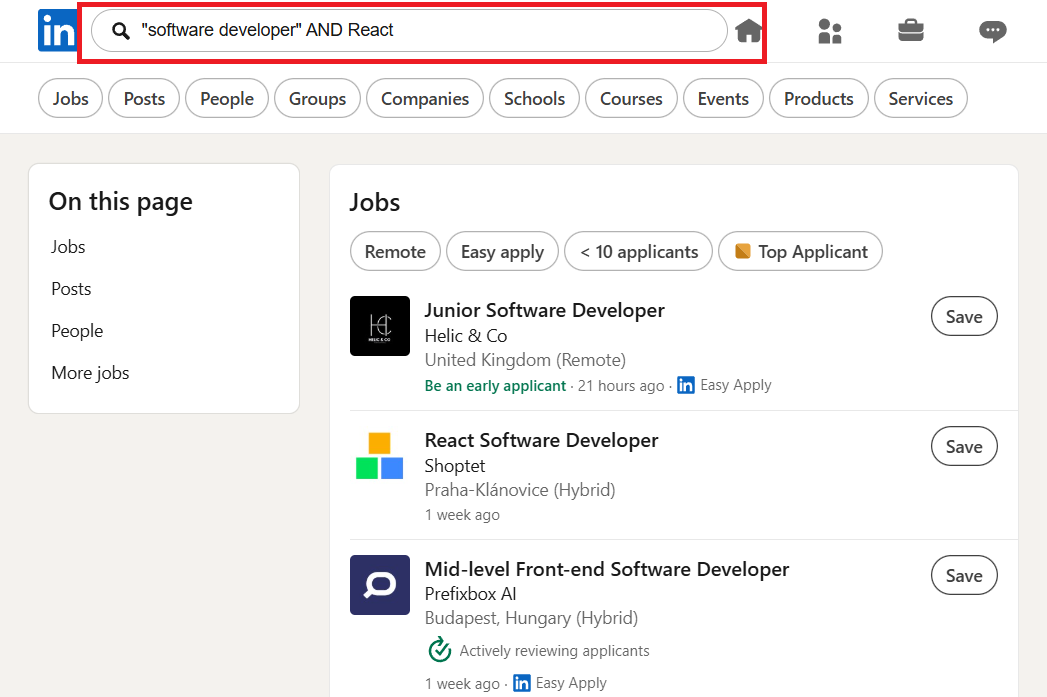
Use LinkedIn Boolean search when normal job search results feel too broad or messy. By using AND, OR, NOT, quotation marks, and parentheses, you can find more relevant jobs and remove roles that do not match your profile.
LinkedIn officially supports Boolean operators like AND, OR, NOT, quotation marks for exact phrases, and parentheses for grouping. LinkedIn also says these operators should be typed in uppercase, and + or - are not officially supported.
How to use it step by step
- Start with your exact role in quotes, like "data analyst".
- Add one important skill using AND, like "data analyst" AND SQL.
- Remove irrelevant roles using NOT, like "data analyst" AND SQL NOT internship.
- Use OR if you are open to similar job titles.
- Use parentheses when your search has multiple options.
- Check both Jobs and Posts tabs for job listings and recruiter hiring posts.
Simple Boolean examples
| Goal | Search Query |
|---|---|
| Data roles with SQL | "data analyst" AND SQL |
| Marketing roles with SEO | "digital marketing" AND SEO |
| Developer roles with React | "software developer" AND React |
| Remove internships | "business analyst" NOT internship |
| Search two roles together | ("data analyst" OR "business analyst") AND SQL |
Boolean search is not only for finding jobs. You can also use it to find recruiters, referrals, and hiring posts.
11. Turn On “Hiring Someone” Notifications to See When Your Network Is Hiring
Turn on LinkedIn job alerts so you get notified when new jobs match your target role, location, and preferences. This helps you find the latest jobs, new jobs today, and fresh hiring opportunities without checking LinkedIn again and again.
LinkedIn says users can create job alerts for a search and choose daily or weekly updates through email, app notifications, or both. LinkedIn also allows up to 20 job alerts at one time.
How to turn it on
- Go to Settings.
- Open Notifications.
- Select Searching for a job.
- Find Hiring someone.
- Turn on relevant notifications.
Why this matters
| Benefit | Why It Helps |
|---|---|
| Early visibility | You see hiring posts faster |
| Warm leads | Jobs come from your network |
| Referral chance | Easier to ask people you know |
| Less competition | Some posts appear before formal listings |
| Better context | You can ask questions before applying |
When someone in your network posts a job, do not just like the post. Comment with something specific.
Use this setting with company-specific alerts, recruiter search, and the 1-hour URL hack. Together, these make your LinkedIn search much stronger than random scrolling.
Key Takeaways
- Use Recruiters Only if you want to search for jobs privately without showing the public Open to Work frame.
- Search for recruiters using terms like “sales recruiter,” “data analyst recruiter,” “HR recruiter,” or “marketing recruiter” to find people who are hiring.
- Before applying cold, check if someone in your network can refer you for the role.
- Use LinkedIn job filters like Date posted, Experience level, Location, Easy Apply, Under 10 applicants, and Employment type to avoid wasting time on random jobs.
- Try the 1-hour URL trick to find very fresh jobs, but remember it is an unofficial LinkedIn search method and may change anytime.
- Search terms like “urgent hiring + role” or “salary + role” to find fast-moving jobs and roles that match your pay expectations.
- Use quotation marks and Boolean search to get cleaner results, such as “data analyst” AND SQL NOT internship.
- Turn on job alerts and hiring notifications so you do not miss new openings from companies, recruiters, or people in your network.
- Do not apply with the same resume everywhere. Match your resume with the job description before applying.
How can I make my LinkedIn profile stand out to recruiters?
For recruiters to notice your profile on LinkedIn it is necessary to have an organized and neat one. A clear headline, a short summary about your work and goals, and listing of your experience through short and easy-to-read points will surely do the trick. Also, don't forget to upload a professional photo and a simple banner enumerating your role. A clean profile allows recruiters to quickly comprehend your abilities and thus your profile becomes unforgettable.
What are some LinkedIn hacks to get noticed by recruiters?
How do I use LinkedIn to apply for the right jobs?
How can I improve my LinkedIn skills section?
Why should I send messages after connecting on LinkedIn?

Got Your Answer ?
Learn this in 30 Seconds 👇

Career Blogs
Our career blog is your go-to resource for insightful advice, practical tips, and the latest trends in the job market.







Office Address: Room No 305, IIT ROPAR-TBIF, Top Floor (East Wing), M.Visvesvaraya, Rupnagar PB, 140001
- Free Online Resume Review
- Check Resume Score
- Job Description Keyword Finder
- Resume Shortlisting Software
- Resume Scanner for Jobs
- Find jobs that match with resume
- Job matching platform
- Resume job matching
- Job suggestion
- Best sites to find jobs
- Free ats resume scanner
- Auto apply for job
- Full Time Jobs
- I Need a Job
- Information Technology Jobs
Can't Find Something? Get in Touch.
©2026 Padhakku Peek A Book Pvt Ltd (Mployee.me)


