

We'll cover
Can ATS Read Tables, Columns and Canva Resumes?
Written by Jatin Batra
- ATS can read simple resumes better than resumes with tables, columns, text boxes, graphics, or heavy Canva designs.
- A single-column resume with clear headings is usually the safest choice for an ATS friendly resume.
- Photos, icons, charts, headers, footers, and colorful blocks may affect resume parsing and readability.
- Bullet points, readable fonts, visible links, and standard sections help recruiters and ATS scan your resume faster.
- Before applying, use an ats score checker or free ATS resume scanner to check my resume for formatting and keyword issues.
We'll cover:
Can ATS Read Tables in Resumes Properly?
ATS can read some simple tables, but tables are still risky in resumes. Many applicant tracking systems parse resumes from top to bottom, so table-based layouts may cause text to appear in the wrong order, get skipped, or become difficult to match with the right section. This can affect job titles, dates, skills, certifications, and work experience. While a recruiter may understand the design visually, the ATS may not process it correctly. For best results, avoid tables and use a clean, single-column resume format with standard headings and simple bullet points in resume.
2 Column Resume vs 1 Column Resume: Which Is Better?
A 1 column resume is better for ATS screening and recruiter readability. While a 2 column resume may look modern, it can confuse applicant tracking systems by making content appear out of order. From a recruiter’s point of view, it can also increase reading effort because the eye has to jump between sections, sidebars, skills, dates, and work history.
| Resume Factor | 1 Column Resume | 2 Column Resume |
|---|---|---|
| ATS readability | Easy for ATS to scan from top to bottom | May cause sections to be read out of order |
| Recruiter experience | Feels clean, structured, and easy to follow | Can feel visually busy or distracting |
| Reading flow | Guides the recruiter naturally through the resume | Forces the reader to move between columns and sidebars |
| Work experience clarity | Keeps job titles, companies, dates, and achievements together | Can separate dates, roles, and achievements from context |
| Keyword visibility | Skills and job-related keywords are easier to detect | Keywords in side columns may be missed or misread |
| Formatting safety | Lower risk of parsing errors | Higher risk if it includes sidebars, text boxes, or icons |
| Best use case | ATS applications, job portals, and recruiter review | Creative portfolios or resumes sent directly to a person |
Should You Use Graphics and Icons in Your Resume?
No, you should avoid graphics and icons if you want an ATS friendly resume. Applicant tracking systems may not read images, icons, skill bars, charts, or decorative elements correctly. Even if they look professional to a human recruiter, they can create parsing issues and may cause important details to be missed. Use plain text instead of icons for phone numbers, emails, LinkedIn links, skills, and certifications. Keep your layout simple, clean, and easy to scan. Before applying, you can use ResuScan’s free ATS resume scanner to check whether your resume format is readable.
Are Colorful Resumes Safe for ATS Screening?
The short answer is yes. Color alone will not usually cause ATS rejection, but poor color choices can make your resume harder to read or parse. If your goal is to create an ATS friendly resume, use color only as a subtle design element, not as the main structure of the document.
Green Light: Safe
Single-column layout, plain text, standard headings, simple bullet points, readable fonts, and light accent colors for headings.
Yellow Light: Use Carefully
PDF files, subtle colors, hyperlinks, divider lines, and minimal formatting can work if the resume remains text-based and easy to read.
Red Light: Avoid
Tables, two-column layouts, icons, images, text boxes, charts, skill bars, scanned PDFs, and design-heavy Canva templates.
Should You Add a Photo to Your Resume?
Resume photo rules are discouraged in many countries because employers want hiring decisions to be based on qualifications, experience, and skills rather than appearance. In markets such as the US, UK, Canada, Australia, and New Zealand, adding a photo may increase the risk of unconscious bias related to age, gender, race, ethnicity, or appearance. It can also create compliance concerns for employers with strict anti-discrimination hiring practices. For most professional roles, a photo does not add measurable value to your resume and may distract from stronger details like achievements, certifications, keywords, and work experience. That is why a clean, photo-free resume is usually safer unless the employer specifically asks for one.
| Region / Country | Resume Photo Guidance | Best Practice |
|---|---|---|
| United States | Usually discouraged | Use a clean, photo-free resume focused on skills and achievements. |
| United Kingdom | Usually discouraged | Avoid adding a photo unless the employer specifically asks for one. |
| Canada | Usually discouraged | Keep the resume professional, ATS-friendly, and photo-free. |
| Australia / New Zealand | Usually discouraged | Do not include a photo unless requested in the job description. |
| India | Optional / role-dependent | Skip the photo for most corporate roles; add one only if requested or relevant to the role. |
| Germany / Austria / Switzerland | Often accepted | A professional headshot may be acceptable, depending on local employer expectations. |
| France / Spain / Italy | Often accepted | Use a formal photo only if it fits the local CV style or job requirement. |
| China / Japan / South Korea | Often expected | A professional photo may be commonly expected for local applications. |
| UAE / Qatar / Saudi Arabia | Often accepted | Follow the employer’s instructions and industry norms before adding a photo. |
Are Canva Resume Templates Good for ATS?
Not always. Canva resumes may look polished, but many templates use columns, text boxes, icons, graphics, and layered design elements that can confuse ATS software. If you have already made your resume in Canva, take these steps before applying:
- Run the copy-paste test: Download your Canva resume as a PDF, copy the text, and paste it into Notepad or a plain text editor. If the content appears jumbled, missing, or out of order, an ATS may read it the same way.
- Switch to a text-first layout: Use a clean, single-column structure with standard headings like Work Experience, Skills, Education, and Certifications to create an ATS friendly resume.
- Check before submitting: Use ResuScan’s free ATS resume scanner to review formatting issues, keyword readability, and overall ATS compatibility before sending your application.
Should You Use Text Boxes in Your CV?
No. Avoid text boxes if you want an ATS friendly resume or CV. While text boxes can make your layout look neat, many applicant tracking systems may read them incorrectly, skip the content inside, or place it in the wrong section.
- Remove text boxes: Keep all content in the main body of the document.
- Use standard headings: Add sections like Work Experience, Skills, Education, and Certifications in plain text.
- Keep the layout linear: Make sure your CV reads clearly from top to bottom.
- Check before applying: Use ResuScan’s free ATS resume scanner to check whether your resume or CV is readable before submitting it.
Can ATS Read Contact Details in Headers and Footers?
Not always. Some ATS systems can read headers and footers, but many may skip or misread contact details placed there. This means your name, phone number, email, LinkedIn profile, or location could be missed during parsing. To keep your resume ATS friendly, place all contact details in the main body at the top of the first page instead of using the header or footer area. Use plain text, avoid icons, and keep the format simple. Before applying, you can run your resume through a free ATS score checker to check whether your contact information is readable.
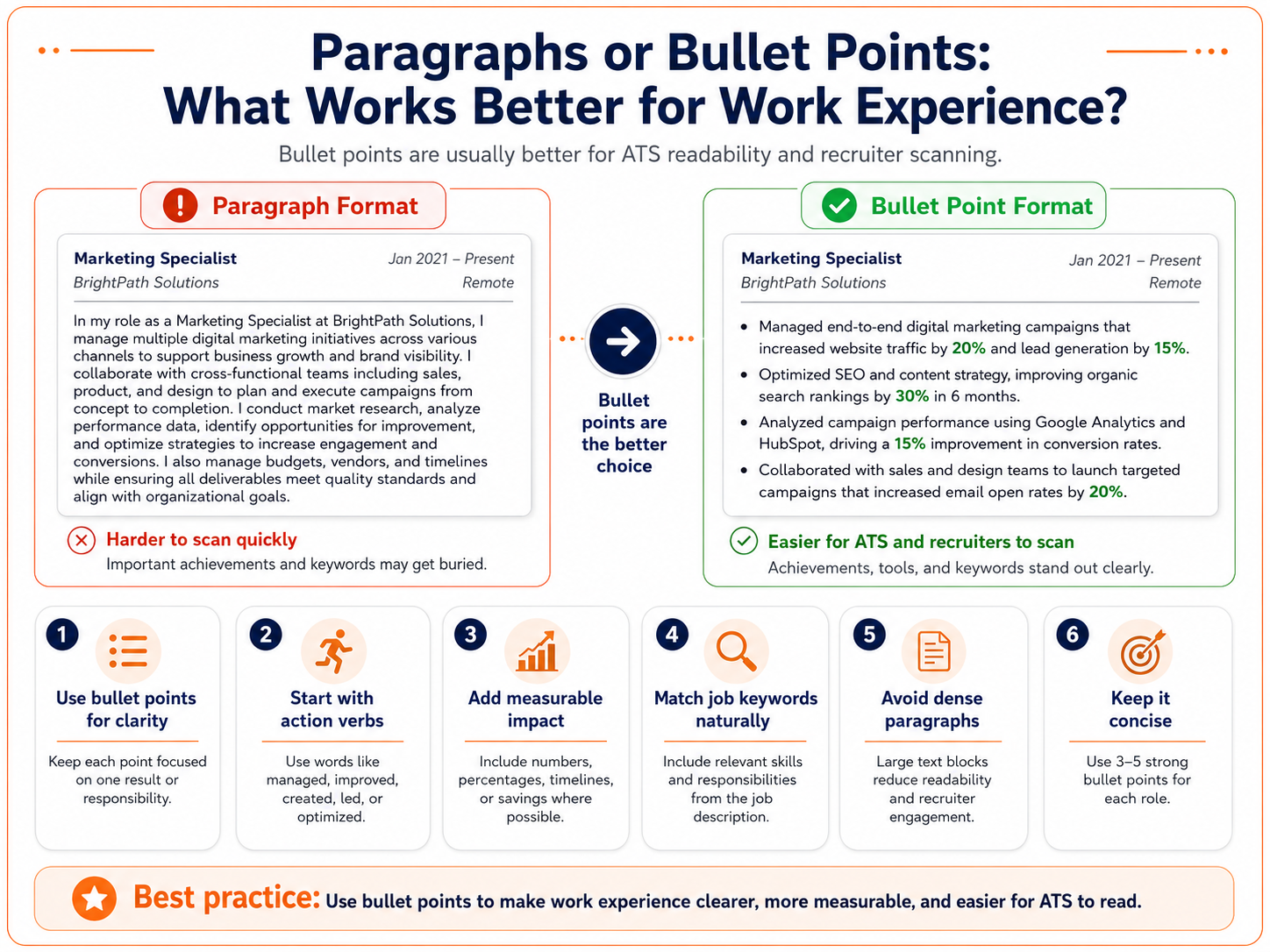
Paragraphs or Bullet Points: What Works Better for Work Experience?
Bullet points work better for work experience because they make your resume easier for recruiters and ATS software to scan. If your goal is to build an ATS friendly resume, bullets help highlight achievements, keywords, tools, and results more clearly than long paragraphs.
- Use bullet points for clarity: Keep each point focused on one achievement, responsibility, or result.
- Start with action verbs: Use words like managed, improved, created, led, reduced, increased, or optimized.
- Add measurable impact: Include numbers, percentages, timelines, revenue, cost savings, or performance improvements where possible.
- Match job keywords naturally: Include relevant skills, tools, and keywords from the job description.
- Avoid dense paragraphs: Large text blocks can make your resume harder to read and reduce recruiter engagement.
- Keep it concise: Use 3–5 strong bullet points for each role instead of listing every task.
Does Resume Design Affect Your ATS Score?
Yes, resume design can affect your ATS score because applicant tracking systems need to read and categorize your resume correctly. Over-designed resumes with columns, tables, text boxes, icons, graphics, images, or unusual fonts can create parsing errors and cause important details to be missed. A clean, simple layout helps the ATS identify your work experience, skills, education, certifications, and keywords more accurately. To build an ATS friendly resume, use clear headings, consistent spacing, readable fonts, and a single-column structure. Good design should support readability, keyword relevance, and recruiter experience.
PDF or Word: What Is the Best Resume File Type for ATS?
Both PDF and Word files can work for ATS, but Word is usually the safer option when no file type is specified. A clean DOCX file is easier for many applicant tracking systems to parse, while a PDF is safe only when it is text-based and not made from images or heavy design layers.
- Use DOCX when unsure: Word files are generally easier for ATS software to read and extract correctly.
- Choose PDF only if requested: A text-based PDF can work well, but scanned or image-based PDFs can cause parsing issues.
- Follow employer instructions: Always submit the file type mentioned in the job application.
- Avoid design-heavy exports: Canva-style PDFs, graphics, icons, and text boxes may affect readability.
- Keep formatting simple: Use standard headings, readable fonts, and a single-column layout for an ATS friendly resume.
- Test before applying: Copy and paste your resume text into a plain text editor. If it appears messy, the ATS may struggle to read it.
Does Font Size Matter for ATS Screening?
Yes, font size matters because it affects how easily your resume can be read by both ATS software and recruiters. ATS may not reject a resume only because of font size, but very small or inconsistent text can hurt readability and make your resume look poorly formatted. Body text is commonly recommended around 10–12 pt, with section headings slightly larger.
- Use 10–12 pt for body text: Keep work experience, skills, and education easy to read.
- Use 12–14 pt for headings: Make sections like Work Experience and Skills clear.
- Keep your name larger: Your name can be around 18–24 pt.
- Avoid tiny fonts: Anything below 10 pt can look cramped and unprofessional.
- Stay consistent: Use the same font size pattern across the resume for a cleaner ATS friendly resume.
Can ATS Read Hyperlinks in a Resume?
Yes, ATS can usually read hyperlinks, but you should not rely only on clickable text like “LinkedIn” or “Portfolio.” Some systems, PDFs, or recruiter tools may strip the hyperlink, which means the recruiter may not see the actual link. To be safe, include a clean, visible URL along with the hyperlink. Resume links are useful for LinkedIn, portfolios, GitHub, writing samples, or project pages when they support your application.
- Use visible URLs: Write links instead of only “LinkedIn.”
- Keep links relevant: Add only LinkedIn, portfolio, GitHub, or role-specific work samples.
- Test every link: Make sure links open properly before submitting.
- Avoid long messy URLs: Use clean, customized links where possible.
- Do not overlink: Too many links can distract recruiters from your core resume content.
Which Is the Best Font Style for an ATS Resume?
The best font style for an ATS resume is simple, professional, and easy to read. Fonts like Arial, Calibri, Helvetica, Verdana, Georgia, Garamond, and Times New Roman are commonly considered ATS-friendly because they are standard and readable across most systems. Avoid decorative, script, or downloaded fonts because they can appear incorrectly on another device or create parsing issues.
- Best overall fonts: Arial, Calibri, Aptos, Helvetica, and Times New Roman.
- Best modern option: Aptos or Calibri for a clean professional look.
- Best classic option: Times New Roman or Georgia for traditional industries.
- Avoid fancy fonts: Script, decorative, handwritten, or overly stylized fonts can hurt readability.
- Use one font family: Mixing too many fonts makes the resume look inconsistent.
- Check before applying: Use an ats score checker or free ATS resume scanner if you want to test whether your formatting is readable.
Key Takeaways
- An ATS-friendly resume should use a simple layout with clear headings, standard fonts, and easy-to-read bullet points.
- Avoid tables, text boxes, icons, charts, and complex Canva designs, as they can confuse ATS software.
- A single-column resume is usually the safest choice because it keeps information in the correct reading order.
- Canva resumes are not always ATS-friendly, so test the text in a plain text editor before applying.
- Place your contact details in the main body at the top of the resume, not in headers or footers.
- Use short bullet points for work experience to highlight achievements clearly and improve readability.
- Focus on skills, experience, and achievements rather than decorative elements or graphic-heavy designs.
- Include a photo only when required by the employer or common practice in the target country.
- Choose the right resume file format; DOCX is often safest, while PDFs should be text-based and readable.
- Before submitting, check formatting, links, contact details, and keywords to ensure ATS compatibility.
How Do I Know If My Resume Is ATS Friendly?
An ATS friendly resume is easy for software to read, parse, and categorize. The safest way to check is to review your layout, file type, headings, and keyword placement before applying. You can also use a tool like ResuScan to scan your resume against a job description and spot missing keywords, formatting issues, or ATS-readability gaps before submission.
- Use a single-column format.
- Keep section headings simple and standard.
- Avoid icons, images, tables, and text boxes.
- Make sure your resume text can be copied and pasted cleanly.
- Use a free ATS resume scanner to identify formatting or readability issues.
If your resume looks clean in plain text, it is usually safer for ATS screening.
What Is the Safest Resume Layout for Online Applications?
Can ATS Read Resume Keywords Properly?
Should I Use a Resume Template for ATS?
What Should I Check Before Submitting My Resume?
Does Resume Formatting Matter More Than Design?
What Makes a Resume Hard for ATS to Read?

Got Your Answer ?

Career Blogs
Our career blog is your go-to resource for insightful advice, practical tips, and the latest trends in the job market.






Office Address: Room No 305, IIT ROPAR-TBIF, Top Floor (East Wing), M.Visvesvaraya, Rupnagar PB, 140001
- Free Online Resume Review
- Check Resume Score
- Job Description Keyword Finder
- Resume Shortlisting Software
- Resume Scanner for Jobs
- Find jobs that match with resume
- Job matching platform
- Resume job matching
- Job suggestion
- Best sites to find jobs
- Free ats resume scanner
- Auto apply for job
- Full Time Jobs
- I Need a Job
- Information Technology Jobs
Can't Find Something? Get in Touch.
©2026 Padhakku Peek A Book Pvt Ltd (Mployee.me)


