

We'll cover
ATS Resume Test: How to See If Your Resume Will Pass
Written by Palak Jain
- 📌Check your resume score before applying.
- 📌ATS resume tests evaluate keywords and format.
- 📌Resume ATS checkers reveal hidden resume issues.
- 📌Fix keywords to improve ATS resume score.
- 📌Simple layouts help resumes pass ATS.
We'll cover:
What is an ATS Resume Test?
An ATS resume test is a process that assesses the quality of your resume in automated hiring systems. A resume ATS checker evaluates, formatting, usage of keywords, the clarity of sections, and the overall readability of the document.
- The first step is to check if the keywords match which confirms that your resume has the same words as the job description.
- The second step is format compatibility that makes sure headings, bullet points, and other sections are read by ATS.
- Scoring means a score for the resume check that shows the strengths and areas that need improvement.
One finance student can check whether “MS Excel,” “financial analysis,” and “accounting software” are skills that ATS has recognized.
How a Resume Scanner Works?
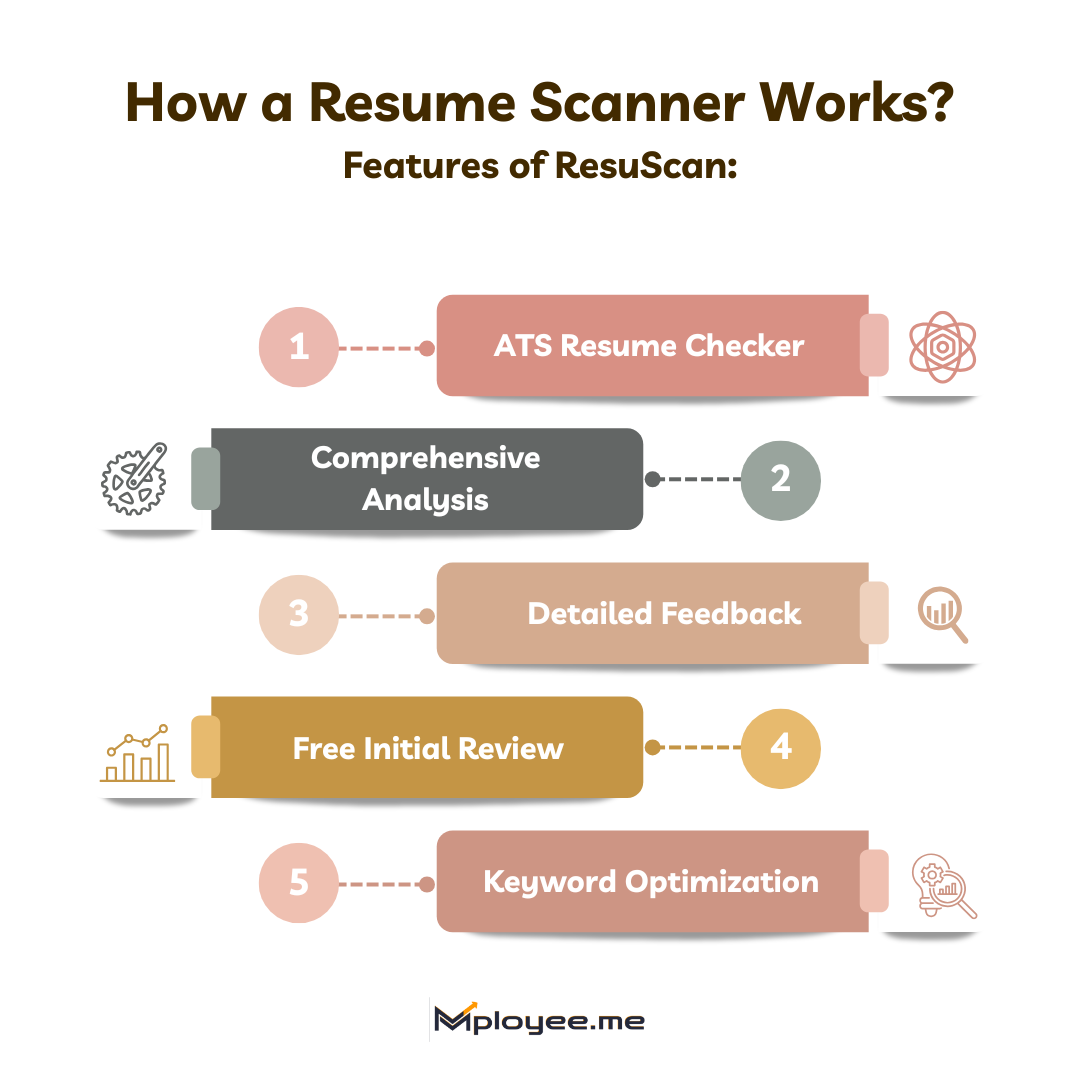
A resume scanner behaves like ATS and reads your resume. It assesses the format, keywords, and structure to give an ATS resume score. ResuScan is a fantastic and powerful tool which makes this process simple and effective.
Features of ResuScan:
- ATS Resume Checker: It is an ATS compatibility checker that scans every part of the resume and points out the mistakes in the headings, sections, and bullet points.
- Comprehensive Analysis: It evaluates more than 40 factors comprising reading ease, keyword usage, content quality, and formatting.
- Detailed Feedback: It gives tips on how to enhance each area that has been identified as weak.
- Free Initial Review: It provides a free check of your resume score to know where to work on improvements.
- Keyword Optimization: It suggests the must-have keywords that should be added according to the job description.
A student majoring in marketing could tell if the skills such as, “Google Analytics,” “SEO campaigns,” and “content creation” have been properly recognized by the ATS.
Why Checking Your Resume Score Matters?
If the resume is not well formatted or lacks the essential keywords, even the well-written and strong resume will be failed by ATS. When you check resume score, it guarantees that your resume gets the first barrier cleared and that it is getting to recruiters.
- With better visibility comes an increase in the probability that your resume will be noticed by the hiring managers.
- Find the missing keywords to make sure you are in line with the job description...
- Fix formatting errors that might reduce your ATS score.
- Free up time by preventing the submission of rejected applications.
A software development student can make sure that the skills “Python,” “SQL,” and “GitHub” are acknowledged by ATS correctly before applying for jobs.
Common ATS Mistakes That Lower Your Resume Score
Even minor errors can reduce your resume’s chances of passing ATS. Avoid these common mistakes:
Mistake 1: Using complex formats
Graphics, tables, or unusual fonts can confuse ATS.
Do: Stick to plain headings and bullet points.
Don’t: Use images or intricate tables.
Mistake 2: Missing keywords
Not matching skills and job description terms lowers ATS score.
Do: Include relevant skills using keyword tools.
Don't: List generic skills without checking the job description.
Mistake 3: Unclear section headings
Non-standard headings like “About Me” may not be read correctly.
Do: Use common headings like Education, Skills, Experience.
Don’t: Rename sections creatively.
Mistake 4: Long paragraphs
Large blocks of text are difficult for ATS to read.
Do: Use concise bullet points.
Don't: Write multiple long sentences without breaks.
Mistake 5: Ignoring resume score feedback
Not testing your resume can leave errors unnoticed.
Do: Check your resume score using ResuScan.
Don't: Submit without reviewing ATS compatibility.
How to Improve Your Resume for ATS?
Making a resume that an ATS can read without problems is very easy if you are doing it right with the following steps:
Step 1: Use a simple layout
Clear formats with standard headings make ATS read your resume accurately.
- A student can place headers such as Education, Skills, Projects, and Experience on a plain white background.
Step 2: Include a concise summary
2 to 3 lines of your experience, strengths, and goals improve clarity.
- A marketing student may say “Marketing student with social media campaign experience. Canva and Excel are skills. Internships for skill application and growth are desired.”
Step 3: Make your education stand out
Degree, college, year, and key subjects must be mentioned.
- A business student may say, “Bachelor of Business Administration, ABC College, 2022–Present, Key Subjects: Marketing, Analytics.”
Step 4: List down skills that are relevant
Mention 5 to 7 skills that correspond to the job description.
- A finance student can present “MS Excel, Tally, Analytical thinking, Time management, Communication.”
Step 5: Discuss your projects or internships
Write bullet points that show your contributions in a clear way.
- A computer student could state “Developed a basic web application for a college event to manage registrations efficiently.”
Step 6: Keywords to be optimized
Find out which resume keywords are lacking by using a resume ATS checker and then incorporate them in a natural manner.
- A content student can make sure that “SEO, WordPress, and content strategy” are included if they are mentioned in the job posting.
By using these six simple steps, your resume will not only be ATS-friendly but will also stand out from the fellow job seekers.
Optimizing Keywords with Job Description Matching
Keywords play a significant role in ATS passing. Tailoring one's resume to the job description increases ATS resume score.
- Use terms appearing in the job description.
- Do not only mention technical but also soft skills that are relevant to the job.
- Do not use keyword stuffing; make them a part of your text.
A marketing student can bring in “social media campaigns, Google Analytics, and email marketing” as their match for the job description requirements.
Real-Life Before and After ATS Resume Test
Look at these examples of before and after scanning a resume on resume check score platform:
Before scanning:
- Headline: "Student seeking opportunities."
- Skills: Generic, unaligned with the job description.
- Format: Fancy fonts and tables.
After using ResuScan:
- Headline: "BBA student focused on digital marketing and social media campaigns."
- Skills: Canva, Google Analytics, Content Creation, Communication, Teamwork.
- Format: Clean, readable layout with standard headings.
- ATS Resume Score: Improved from 55% to 85%.
This improvement increases chances of passing ATS and being noticed by recruiters.
ATS-Friendly Resume Templates
Here are a few ATS-friendly resume templates:
Result-driven marketing professional with 5+ years of experience driving brand growth demand generation campaign optimization and performance analytics delivering measurable ROI improvements of 42% through data-led strategy audience insights cross-channel execution stakeholder alignment experimentation and continuous optimization across digital ecosystems supporting scalable pipelines customer acquisition retention velocity revenue outcomes globally.
- Led integrated digital campaigns across search social email and content channels managed 450K ad spend increased qualified inbound leads and reduced cost per acquisition through testing
- Developed go to market strategies for new product launches aligning positioning messaging and distribution to improve campaign conversion rates by 26% across platforms
- Collaborated with product sales and design teams ensuring consistent brand storytelling and funnel alignment improving customer engagement metrics across acquisition journeys
- Analyzed campaign performance dashboards audience behavior trends and attribution models enabling leadership decisions while improving overall marketing ROI by 31%
- Executed performance marketing campaigns across paid media SEO and email channels increasing website traffic by 44% through keyword optimization targeting and creative iteration
- Managed content calendars social media publishing and influencer collaborations improving brand reach consistency and organic engagement growth across digital channels
- Tracked marketing KPIs budgets and conversion funnels improving reporting accuracy and enabling revenue attribution improvements of 29% across quarterly campaigns
- Digital Marketing
- Campaign Strategy
- Brand Positioning
- Performance Analytics
- Content Marketing
- Marketing Automation
- SEO Optimization
- Audience Targeting
- Growth Strategy
- Executed integrated launch campaigns across digital channels aligning messaging creatives and funnels increasing product adoption by 35%
- Coordinated cross functional teams tracking campaign milestones budgets and performance metrics ensuring timely delivery and sustained post launch momentum
- Redesigned email nurturing workflows segmentation logic and personalization rules improving lead to conversion rates by 28% across inbound marketing funnels
- Integrated CRM analytics and automation dashboards enabling real-time visibility into campaign performance and lifecycle progression
- Google Digital Marketing Certification Mar 2024
- Meta Performance Marketing Certification Nov 2023
- HubSpot Content Marketing Certification Jul 2022
- SEO Specialization – Coursera Feb 2021
Result-oriented professional with 5+ years of experience in financial analysis budgeting forecasting and compliance delivering 18% efficiency improvement through data accuracy risk control stakeholder collaboration automation and disciplined reporting supporting strategic decisions scalable growth profitability governance and sustainable financial performance across dynamic business environments.
- Led monthly financial reporting variance analysis and forecasting cycles improved budget accuracy by 22% and supported leadership decisions through insights and structured reviews
- Managed end to end budgeting processes for 7.5M annual spend coordinating with cross functional teams and reducing cost leakages through controls and vendor analysis
- Built automated financial models dashboards and MIS reports accelerating reporting timelines by 30% while enhancing data transparency audit readiness and management visibility
- Partnered with audit tax and compliance teams ensured regulatory adherence risk mitigation and timely closures improving statutory filing accuracy by 18%
- Handled accounts payable receivable reconciliations and ledger scrutiny reducing discrepancies by 25% while strengthening financial controls and documentation accuracy
- Supported quarterly closures cash flow tracking and expense analysis improving working capital utilization by 12%
- Prepared management reports variance summaries and profitability analysis enhancing decision quality and improving cost optimization outcomes by 20%
- Assisted statutory audits taxation filings and compliance reviews ensuring error free submissions and improving audit closure timelines by 14%
- Financial Analysis
- Advanced Excel
- SOX Compliance
- Financial Modeling
- Variance Analysis
- Cost Control
- ERP Systems
- Audit Support
- MIS Reporting
- Designed centralized budgeting framework integrating department inputs forecasts & approvals improving financial visibility & planning accuracy
- Automated expense tracking and variance dashboards reducing manual effort and enabling leadership to identify cost overruns and savings opportunities
- Collaborated with finance operations and management teams implementing controls policies and review mechanisms strengthening governance and profitability outcomes
Master of Business Administration in Finance
Bachelor of Business Administration
- Chartered Financial Analyst Level I Aug 2023
- Financial Modeling and Valuation Analyst Mar 2022
- Certified Management Accountant Foundations Jul 2021
- Corporate Finance Essentials Coursera Feb 2020
Experienced professional with 6+ years in human resources driving talent acquisition engagement compliance and workforce planning delivering 95% retention improvement through structured processes data driven insights stakeholder collaboration policy execution and people centric initiatives across growing organizations enabling scalable teams strong culture operational discipline leadership trust and consistent business outcomes.
- Led end to end recruitment onboarding and workforce planning for 50+ positions while strengthening hiring governance alignment and cross functional collaboration
- Improved employee retention by 32% through structured engagement initiatives performance reviews leadership coaching and continuous feedback mechanisms
- Partnered with leadership teams to ensure HR policy compliance statutory adherence and disciplined people governance across departments
- Streamlined HR operations payroll coordination and vendor management processes ensuring consistency operational efficiency and improved internal service delivery
- Managed recruitment lifecycle employee relations and grievance handling improving hiring quality by 26% across multiple business functions
- Executed learning and development programs supporting capability building leadership readiness and long term employee growth initiatives
- Improved HR reporting accuracy by 31% through structured MIS documentation audit readiness and standardized review processes
- Supported appraisal compensation benchmarking & performance review cycles ensuring fairness transparency & timely execution across teams
- Handled onboarding documentation exit processes and employee coordination improving overall candidate and employee experience by 23%
- Maintained employee records HR databases and compliance trackers ensuring data accuracy confidentiality and audit readiness
- Increased engagement participation by 38% through feedback surveys townhalls communication initiatives and employee connect programs
- Supported payroll coordination attendance tracking and HR policy implementation ensuring smooth operational continuity
- Talent Acquisition
- Employee Engagement
- HR Operations
- Policy Compliance
- HCM Systems
- HRIS
- HR Analytics
- Workforce Planning
- Regulatory Reporting
- HR Dashboards
- Compliance Audits
- Payroll Processing
Master of Business Administration in Human Resource
Bachelor of Business Administration
- SHRM Human Resource Management Certification Mar 2023
- HR Analytics Certification – Coursera Aug 2022
- Labor Laws and Compliance Certification Jan 2021
- Received Star Performer Award for consistent excellence in people management initiatives
- Earned Client Appreciation for delivering reliable HR operations and stakeholder satisfaction
- Analyzed large scale job and resume datasets using Python and SQL to extract actionable insights supporting product optimization and user engagement strategies
- Built automated dashboards tracking user behavior conversion funnels and resume scoring metrics improving reporting accuracy by 35% across internal teams
- Collaborated with product and engineering teams to translate analytical findings into feature improvements enhancing data driven decision making workflows
- Optimized data cleaning and preprocessing pipelines reducing manual data handling efforts by 40% while improving overall analysis consistency
- Python
- SQL
- HTML
- CSS
- Data Cleaning
- EDA
- Statistical Analysis
- Data Modeling
- Power BI
- Tableau
- Data Visualization
- Advanced Excel
- Analyzed multi region sales datasets using Python and SQL to identify revenue trends customer behavior patterns and underperforming segments
- Built interactive Power BI dashboards presenting KPIs sales growth and category performance enabling faster data driven business decisions
- Automated data transformation workflows improving reporting efficiency and reducing repetitive manual analysis tasks significantly
- Performed exploratory data analysis on telecom customer datasets to identify churn drivers using statistical methods & visual analysis techniques
- Prepared insight driven reports highlighting churn factors supporting strategic recommendations for improving customer retention outcomes
- Google Data Analytics Professional Certificate – Coursera Feb 2024
- Data Analysis with Python – IBM Nov 2023
- SQL for Data Analysis – Udemy Jul 2023
Result-driven professional with 4+ years of experience transitioning from financial analysis to project management delivering 28% efficiency improvement through structured planning stakeholder alignment risk control data driven execution and cross functional leadership enabling timely delivery scalable processes and measurable business outcomes.
- Led a cross functional team of 6+ members managing project scope timelines and deliverables ensuring 96% on time completion within initiatives
- Improved project delivery efficiency by 34% through sprint planning milestone tracking risk mitigation frameworks and continuous stakeholder communication
- Coordinated with product finance and technology teams translating business requirements into execution plans aligning priorities budgets and operational constraints
- Established project governance dashboards reporting cadence and documentation standards improving visibility accountability and decision making consistency across leadership
- Analyzed financial statements budgets and forecasts supporting strategic decisions and improving cost control accuracy by 29%
- Delivered variance analysis and management reports improving forecasting reliability by 32% through structured modeling assumptions and data validation
- Partnered with project teams to track expenditures ROI metrics and financial risks supporting informed planning and optimized resource allocation
- Automated recurring financial reports and dashboards reducing manual effort improving data consistency and enhancing executive visibility
- Managed accounting operations reconciliations and reporting processes improving month end closure efficiency through standardized controls
- Supported budgeting audits and compliance activities achieving 98% audit accuracy through disciplined documentation and regulatory adherence
- Prepared financial summaries cash flow statements and variance insights supporting management reviews and operational decision making
- Collaborated with cross functional teams to streamline finance workflows improving turnaround time accuracy and internal service effectiveness
- Project Planning
- Stakeholder Management
- Risk Management
- Agile Delivery
- Budget Control
- Resource Allocation
- Timeline Tracking
- Performance Reporting
- Financial Analysis
- Cost Forecasting
- Variance Analysis
- Business Finance
Bachelor of Commerce
- Project Management Professional Certification Feb 2024
- Agile Project Management Certification Oct 2023
- Financial Analysis & Valuation Certification Aug 2021
Key Takeaways
An ATS resume test that is performed periodically is one way to increase the chances of your resume being seen.
- Check resume score with an ATS resume checker.
- Do not hesitate to use a single-fashioned and understandable layout.
- Use job descriptions to align your keywords.
- List your skills, projects, and experience that are relevant.
- Headings that are unclear or complicated should be avoided in your design.
- Use ResuScan to assess and suggest improvement in your resume.
- Resume Keywords by mployee.me will help you to make your keywords more effective.
- Every time you apply for a job, update your resume.
The quality and optimization of your resume, will pass ATS, get screened by recruiters, and subsequently lead to interviews.
How do I know if my CV will pass ATS?
By using a resume ATS checker like ResuScan, you can find out if your CV is going to be accepted by ATS. It checks your resume for proper formatting, keywords, and readability, and then gives you an ATS resume score that allows you to determine if it is up to the standards of automated screening.
How to check ATS score for resume?
How to make sure resume passes ATS?
Can ChatGPT check ATS score of resume?
Is 72 a good ATS score?

Got Your Answer ?
Learn this in 30 Seconds 👇

Career Blogs
Our career blog is your go-to resource for insightful advice, practical tips, and the latest trends in the job market.
.png)






Office Address: Room No 305, IIT ROPAR-TBIF, Top Floor (East Wing), M.Visvesvaraya, Rupnagar PB, 140001
- Free Online Resume Review
- Check Resume Score
- Job Description Keyword Finder
- Resume Shortlisting Software
- Resume Scanner for Jobs
- Find jobs that match with resume
- Job matching platform
- Resume job matching
- Job suggestion
- Best sites to find jobs
- Free ats resume scanner
- Auto apply for job
- Full Time Jobs
- I Need a Job
- Information Technology Jobs
Can't Find Something? Get in Touch.
©2026 Padhakku Peek A Book Pvt Ltd (Mployee.me)


